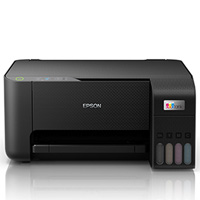
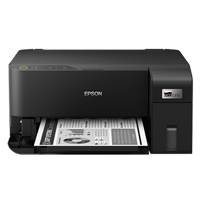
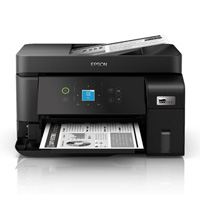
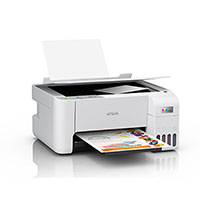
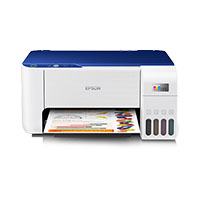
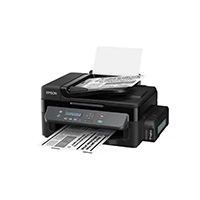
Epson Eco Tank M3170 Wireless Monochrome All-in-One Printer
Cash Price: ৳38,500.00 Regular Price:৳40,500.00Availability: In Stock SKU: 1.3.8.949
Quick Overview
-
Support
Saturday – Thursday: 09 AM - 06 PM. -
Payment
Cash on Delivery | Card | Online Payment -
Shipping Cost
Inside Dhaka 500tk | Outside Dhaka 1000tk -
Warranty Policy
Read More
Specification
General Information
| Brand | Epson |
| Model | EcoTank ET-M3170 |
| Device Type | Multifunction printer |
| Fax Type | Plain paper |
| Printing Technology | Ink-jet - monochrome |
| Display Diagonal Size | Display Color Support |
| Display Features | Touch screen |
Copying
| Max Copying Speed | Up to 17 ppm |
| Max Copying Resolution | Up to 600 x 600 dpi |
| Max Document Enlargement | 400% |
| Max Document Reduction | 25% |
| Maximum Copies | 99 |
Printing
| Inkjet Technology | Epson PrecisionCore |
| Refillable Tank | Yes |
| Max Printing Resolution | Up to 1200 x 2400 dpi |
| Max Printing Resolution Class | Up to 1200 x 2400 dpi |
| Max Printing Speed | Up to 20 ppm |
| Printer Drivers / Emulations | EPSON ESC/P-R |
| Automatic Duplexing | Yes |
| First Print Out Time B/W | 6 sec |
Scanning
| Scan Element | CIS |
| Optical Resolution | 1200 x 2400 dpi |
| Interpolated Resolution | 9600 dpi |
| Color Depth | 24-bit |
| Color Depth (Internal) | 48-bit |
Fax Machine
| Compatibility | Super G3 |
| Max Transmission Speed | 33.6 Kbps |
| Total Memory Capacity | Up to 180 pages |
| PC Faxing | Yes |
Fax Machine Features
| Error Correction Mode (ECM) | Yes |
| Speed Dialing | 100 station(s) |
| Broadcast Transmission | Yes (black only) |
| Features | Automatic redialing, poll receive, transmit reservation, fax preview |
Document & Media Handling
| Max Original Size | Legal (8.5 in x 14 in) |
| Max Media Size | A4/Legal |
| Supported Media Type | Envelopes, plain paper, photo paper |
| Standard Media Capacity | 250 sheets |
Connections
| Interfaces | 1 x USB 2.0, 1 x Gigabit LAN |
| Security Protocols & Features | Wi-Fi Direct |
| Operating System Support | Windows 8, MS Windows Server 2003 SP2 or later, MS Windows Vista (32/64 bits), MS Windows 7 (32/64 bits), Windows 8.1 (32/64-bits), Windows 10, MS Windows Server 2016, Apple Mac OS X 10.6.8 - 10.13.x |
Power
| Voltage Required | AC 120/230 V (50/60Hz) |
| Power Consumption Operational | 12 Watt |
| Power Consumption Standby | 4.3 Watt |
| Power Consumption Sleep | 0.7 Watt |
Manufacturer Warranty
| Service & Support | Limited warranty - 2 years with product registration |
Description
Epson EcoTank ET-M3170 Wireless Monochrome All-in-One Printer Price in Bangladesh
The Epson EcoTank M3170 Wireless Monochrome All-in-One Printer stands as a testament to the innovative technology and user-centric design that Epson is renowned for. Engineered for efficiency and reliability, this multifunctional printer is a remarkable solution for both home and office use, particularly gaining popularity in Bangladesh's dynamic market. With its sleek design, it seamlessly fits into any workspace, while offering a powerhouse of features including high-resolution printing, scanning, copying, and fax capabilities. The M3170 is not just a printer; it's a smart investment for those seeking to streamline their printing tasks with cost-effectiveness and environmental sustainability in mind. This introduction aims to delve into the specifics of this model, showcasing why it's becoming a go-to choice for quality printing solutions in Bangladesh.
The Epson EcoTank M3170 Wireless Monochrome All-in-One Printer, known for its efficiency and multifunctionality, is priced competitively in the Bangladeshi market. As of the latest update, the price of the Epson M3170 in Bangladesh ranges between BDT 40,000 to BDT 45,000. This price variation depends on the retailer, current market trends, and potential promotional offers. The M3170 offers exceptional value for its cost, considering its high-resolution printing, refillable ink tank system, and versatile functionality in printing, scanning, copying, and faxing. It's a cost-effective choice for both Businesses, Home office, and Office use, particularly for those prioritizing monochrome printing with high efficiency and low operating costs.
Key Features of Epson EcoTank M3170 in Bangladesh
The Epson EcoTank M3170 All-in-One Printer is a powerhouse of functionality and efficiency. This section explores the core features and advantages that make this printer a standout choice.
High-Quality Monochrome Printing
PrecisionCore Technology: At the heart of the M3170's printing capabilities lies Epson's advanced PrecisionCore technology, ensuring crisp, clear, and professional-quality monochrome prints.
High Resolution & Speed: Achieve maximum printing resolutions of up to 1200 x 2400 dpi, coupled with impressive printing speeds of up to 20 pages per minute, making it ideal for high-volume printing tasks.
Innovative Ink Efficiency
Refillable Tank System: The EcoTank M3170 features a large, easily refillable ink tank, significantly reducing the cost per print and eliminating the need for frequent cartridge replacements.
Economic Ink Usage: This system not only cuts down on operating costs but also aligns with environmentally conscious printing practices.
Versatile Copying Features
Fast and Flexible Copying: With a maximum copying speed of up to 17 ppm and a resolution of 600 x 600 dpi, the printer efficiently handles all your copying needs.
Adjustable Document Size: It offers extensive flexibility with up to 400% document enlargement and 25% reduction, accommodating a variety of copying requirements.
Advanced Scanning Specifications
High-Resolution Scanning: The M3170 comes equipped with a CIS scan element, offering an optical resolution of 1200 x 2400 dpi and an interpolated resolution of 9600 dpi, capturing every detail.
Depth and Clarity: The 24-bit color depth and 48-bit internal color depth ensure accurate color reproduction and clear, sharp images.
Efficient Fax Functionality
Super G3 Compatibility: The printer supports Super G3 fax standards, providing swift and reliable fax transmission at 33.6 Kbps.
Enhanced Fax Features: With a capacity to store up to 180 pages and features like PC faxing, automatic redialing, and speed dialing of 100 stations, it simplifies your faxing tasks.
Automatic Duplexing
Time and Resource Saving: The automatic duplexing feature allows for double-sided printing, reducing paper usage and saving time, especially for bulk printing tasks.
Epson EcoTank M3170 Connectivity and Compatibility
The Epson EcoTank M3170 All-in-One Printer is designed to effortlessly integrate into any modern workspace, offering a range of connectivity options and broad compatibility with various operating systems. This section highlights these key aspects, emphasizing the printer's versatility in different environments.
Diverse Connectivity Options
USB 2.0 and Gigabit LAN: For traditional wired connections, the M3170 includes a standard USB 2.0 port and a Gigabit LAN interface, ensuring stable and fast data transfer.
Wi-Fi Direct: Embracing wireless technology, the printer features Wi-Fi Direct, allowing for seamless connection and printing from multiple devices without the need for a central network.
Broad Operating System Support
Windows Compatibility: The printer is compatible with a wide range of Windows operating systems, including Windows 8, Windows 8.1 (32/64-bits), and Windows 10, as well as MS Windows Server 2003 SP2 or later versions and MS Windows Server 2016.
Mac OS X Support: For Mac users, the M3170 supports Apple Mac OS X 10.6.8 to 10.13.x, ensuring seamless integration with Apple's ecosystem.
Mobile Printing Capability
Smart Device Printing: With the increasing use of smartphones and tablets in professional environments, the M3170 accommodates mobile printing needs. Users can print directly from their mobile devices, enhancing flexibility and convenience in the workplace.
Epson EcoTank M3170 Maintenance and Warranty
Maintaining the Epson EcoTank M3170 All-in-One Printer ensures its longevity and consistent performance. Additionally, understanding the warranty terms is crucial for peace of mind and support. This section provides guidance on maintenance practices and details the warranty coverage.
Routine Maintenance for Optimal Performance
Regular Cleaning: To maintain print quality, regularly clean the print head and ink tank area. This prevents ink clogs and ensures smooth ink flow.
Software Updates: Keep the printer's firmware and drivers up-to-date. Regular software updates can enhance functionality and security.
Proper Ink Management: Use genuine Epson inks to avoid potential damage and to ensure the best print quality. Monitor ink levels and refill the tanks as needed.
Troubleshooting Common Issues
Paper Jams: Follow the user manual's instructions to safely remove any jammed paper. Regularly check for and remove debris that might cause jams.
Connectivity Problems: Resetting the network settings can often resolve connectivity issues for Wi-Fi or LAN connections.
Warranty Coverage and Support
Two-Year Limited Warranty: The EcoTank M3170 comes with a limited two-year warranty, provided by Epson upon product registration. This warranty covers manufacturing defects and certain operational issues.
Extended Support Options: Epson offers additional support services and extended warranties for purchase, providing extra coverage and peace of mind.
FAQs about the Epson EcoTank M3170
What type of printer is the Epson EcoTank M3170?
The Epson EcoTank M3170 is a wireless monochrome all-in-one printer. It supports printing, scanning, copying, and faxing, and uses inkjet technology with a refillable tank system.
Can the Epson EcoTank M3170 print in color?
No, the EcoTank M3170 is a monochrome printer, meaning it only prints in black and white. It is not designed for color printing.
What is the printing speed of the Epson M3170?
The Epson M3170 offers a maximum printing speed of up to 20 pages per minute, making it suitable for high-volume printing tasks.
Does the Epson M3170 support automatic duplex printing?
Yes, the Epson EcoTank M3170 supports automatic duplex (double-sided) printing, which helps save paper and is convenient for printing multi-page documents.
What is the maximum resolution for scanning on the M3170?
The M3170 has an optical scanning resolution of 1200 x 2400 dpi and an interpolated resolution of 9600 dpi, providing high-quality scanning capabilities.
Can I print from my mobile device with the Epson M3170?
Yes, the Epson M3170 supports mobile printing, allowing you to print documents and images directly from your smartphone or tablet.
What types of paper can the Epson M3170 handle?
The printer is versatile in media handling, supporting envelopes, plain paper, photo paper, and more, with a maximum media size of A4/Legal.
What are the connectivity options for the Epson M3170?
The M3170 offers several connectivity options, including USB 2.0, Gigabit LAN for wired connections, and Wi-Fi Direct for wireless connectivity.
How energy efficient is the Epson M3170?
The Epson M3170 is designed to be energy-efficient, with a power consumption of 12 Watts during operation, 4.3 Watts in standby mode, and 0.7 Watts in sleep mode.
What is the warranty period for the Epson EcoTank M3170?
The Epson EcoTank M3170 comes with a limited two-year warranty upon product registration, covering manufacturing defects and certain operational issues.
More: Photo Printer Price in Bangladesh
- Epson EcoTank M2170 Wi-Fi Duplex All-in-One Printer
- Epson EcoTank L6460 Color Multifunction InkTank Printer
- Epson EcoTank L6490 Multifunction Color Ink Tank Printer
- Epson EcoTank M2140 3-in-1 Mono Printer
Conclusion
After a thorough examination of the Epson EcoTank M3170 Wireless Monochrome All-in-One Printer, it's clear that this device is a robust and versatile choice for a range of printing needs. Here are the final thoughts and recommendations based on its features and performance.
Economic Ink Usage: The refillable ink tank system is a standout feature, offering significant cost savings in the long term and making the M3170 an economical choice.
Versatility in Function: With its all-in-one capabilities – printing, scanning, copying, and faxing – this printer caters to a multitude of needs, making it ideal for a variety of users, from small business owners to home office users.
High-Quality Output: The printer’s high-resolution printing ensures crisp and clear documents, suitable for professional environments where quality is paramount.
Monochrome Printing: It’s important to note that this is a monochrome printer. Those requiring color prints will need to consider other options.
Space Efficiency: Its compact design makes it a good fit for limited spaces, a key consideration for small offices or home setups.
Small to Medium Businesses: The M3170 is particularly well-suited for small to medium-sized businesses that require efficient, high-quality monochrome printing with the added benefits of copying, scanning, and faxing.
Office and Home Offices: Individuals working from home who need a reliable, multi-functional printer will find the M3170 to be a valuable addition to their Office and home office.
What is the price of Epson Eco Tank M3170 Wireless Monochrome All-in-One Printer in Bangladesh?
Topics products
Write a review
Question Answer
Have question about this product? Get specific details about this product from expert.